-
Shop
- Advanced Technologies
- AI Skills
- Bathroom
- Best-Sellers
- Car Accessories
- Confidence
- Dating & Social Skills
- Digital Resources
- AI & Technology
- Beauty
- Budgeting & Saving
- Car Buying & Ownership
- Cozy Feast Collection
- Electronics & Technology
- Entrepreneurship & Business Growth
- Financial Education
- Financial Independence
- Financial Mindset & Psychology
- Goal Setting
- Home Styling & Organization
- Kitchen & Recipes
- Leadership
- Mindfulness
- Mindset
- Online Business
- Parenting & Child Development
- Personal Style & Fashion
- Pet Lifestyle & Wellness
- Positive Thinking
- Sleep Improvement
- Smart Life with AI
- Stress Management & Relaxation
- Travel Planning
- Wellness
- Yoga & Fitness
- Yoga & Mind-Body Practices
- Education & Learning
- Family & Parenting
- Fashion
- Accessories
- Alexander McQueen
- Bags
- Bags & Wallets
- Balenciaga
- Belts
- Blazers
- Bottega Veneta
- Bottoms
- Brunello Cucinelli
- Burberry
- Chanel
- Chloé
- Dior
- Dolce & Gabbana
- Dresses
- Etro
- Fendi
- Gucci
- Hats & Hair Accessories
- Hoodies & Sweatshirts
- Jacquemus
- Jewelry
- Jil Sander
- Kiton
- Luggage
- Miu Miu
- Off-White
- Outerwear
- Prada
- Rick Owens
- Saint Laurent
- Shoes
- Socks & Tights
- Sweaters & Cardigans
- The Row
- Tom Ford
- Tops & Shirts
- Valentino
- Valentino Garavani
- Versace
- Vivienne Westwood
- Watches
- Fashion Accessories
- Furniture
- Gadgets
- Health & Beauty
- Health & Wellness
- Home & Garden
- Home Decor
- Home Electronics
- Home Supplies
- Kids & Babies
- Kitchen
- Kitchen Best-Sellers
- Lighting
- Patio, Lawn & Garden
- Personal Growth
- Pet Care
- Pet Supplies
- Pets
- Sport & Outdoors
- Super Deals
- Travel
- Travel & Adventure
- Wealth
- Popular
- Best deals
Is a Vertical Mouse Really More Ergonomic?
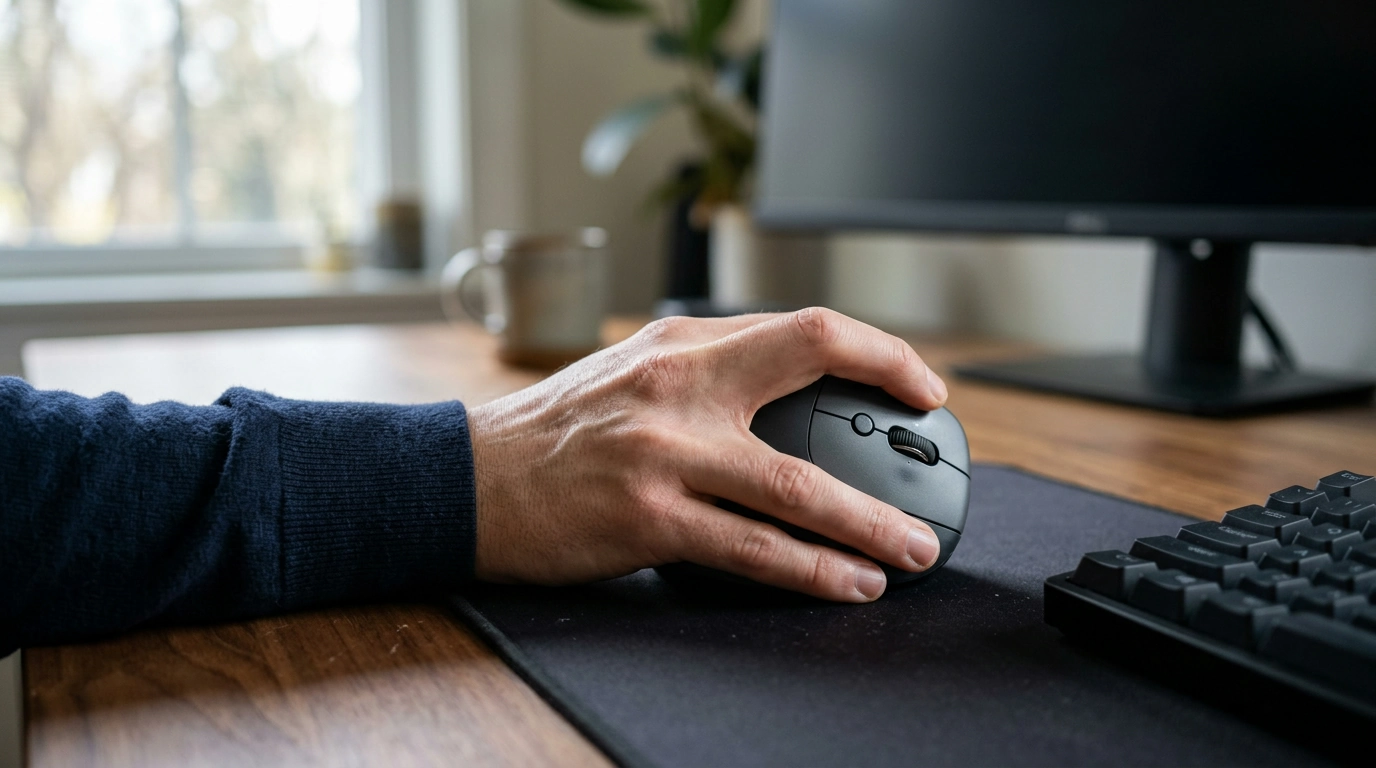
Is a vertical mouse really more ergonomic?
A vertical mouse can be more ergonomic because it lets you hold your hand in a handshake-like position rather than turning your palm flat against the desk. That position may reduce forearm twisting and help some people feel more comfortable during long computer sessions. It is not automatically the best choice for everyone, though: fit, technique, and your overall workstation setup matter too.
Our team recommends treating a vertical mouse as one part of a comfortable workspace, not as a guaranteed fix for wrist or arm pain.
What makes a vertical mouse different?
A conventional mouse usually places your palm downward. A vertical design tilts the grip so your thumb rests on one side and your fingers operate the buttons on the other. This more neutral forearm position can feel natural if a flat mouse leaves you twisting or gripping tightly.
The angle also changes how you move and click. You may need a few days to adjust, especially for precise tasks. Start with shorter sessions if the new position feels unfamiliar.
How do you choose a comfortable vertical mouse?
Look for a shape that supports your palm without forcing you to stretch for the buttons. Your fingers should reach the primary buttons and scroll wheel comfortably, and your thumb should have a resting place that does not require constant pressure.
- Size and hand: Choose a mouse suited to your hand and whether you use your right or left hand.
- Grip: Avoid a shape that makes you pinch tightly or bend your wrist to reach the controls.
- Pointer speed: Adjustable DPI lets you tune how far the pointer travels, so you can find a setting that feels controlled without excessive movement.
- Desk space: Leave enough room to move the mouse with your forearm rather than relying on repeated wrist movements.
For more on features to consider, explore our guide to wireless vertical ergonomic mice and DPI adjustment.
How should you use one?
Keep the mouse close to your keyboard, with your shoulder relaxed and your elbow near your side. Aim for a straight, comfortable wrist, use a light grip, and take regular breaks from repetitive work. Adjust your chair and desk so you are not reaching upward or outward for the mouse.
If discomfort persists, worsens, or includes numbness or tingling, consult a healthcare professional. A different mouse may help with comfort, but it cannot diagnose or treat an underlying condition.
FAQ
How long does it take to get used to a vertical mouse?
Many people need a few days of practice to feel comfortable with the different grip and button positions. You can alternate with your usual mouse while you adjust.
Recommended for you



Best Ergonomic Vertical Mouse: What to Look For
Nov 20, 2026













Leave a comment