-
Shop
- Advanced Technologies
- AI Skills
- Bathroom
- Best-Sellers
- Car Accessories
- Confidence
- Dating & Social Skills
- Digital Resources
- AI & Technology
- Beauty
- Budgeting & Saving
- Car Buying & Ownership
- Cozy Feast Collection
- Electronics & Technology
- Entrepreneurship & Business Growth
- Financial Education
- Financial Independence
- Financial Mindset & Psychology
- Goal Setting
- Home Styling & Organization
- Kitchen & Recipes
- Leadership
- Mindfulness
- Mindset
- Online Business
- Parenting & Child Development
- Personal Style & Fashion
- Pet Lifestyle & Wellness
- Positive Thinking
- Sleep Improvement
- Smart Life with AI
- Stress Management & Relaxation
- Travel Planning
- Wellness
- Yoga & Fitness
- Yoga & Mind-Body Practices
- Education & Learning
- Family & Parenting
- Fashion
- Accessories
- Alexander McQueen
- Bags
- Bags & Wallets
- Balenciaga
- Belts
- Blazers
- Bottega Veneta
- Bottoms
- Brunello Cucinelli
- Burberry
- Chanel
- Chloé
- Dior
- Dolce & Gabbana
- Dresses
- Etro
- Fendi
- Gucci
- Hats & Hair Accessories
- Hoodies & Sweatshirts
- Jacquemus
- Jewelry
- Jil Sander
- Kiton
- Luggage
- Miu Miu
- Off-White
- Outerwear
- Prada
- Rick Owens
- Saint Laurent
- Shoes
- Socks & Tights
- Sweaters & Cardigans
- The Row
- Tom Ford
- Tops & Shirts
- Valentino
- Valentino Garavani
- Versace
- Vivienne Westwood
- Watches
- Fashion Accessories
- Furniture
- Gadgets
- Health & Beauty
- Health & Wellness
- Home & Garden
- Home Decor
- Home Electronics
- Home Supplies
- Kids & Babies
- Kitchen
- Kitchen Best-Sellers
- Lighting
- Patio, Lawn & Garden
- Personal Growth
- Pet Care
- Pet Supplies
- Pets
- Sport & Outdoors
- Super Deals
- Travel
- Travel & Adventure
- Wealth
- Popular
- Best deals
4K WiFi Body Camera: Night Vision & Motion Detection
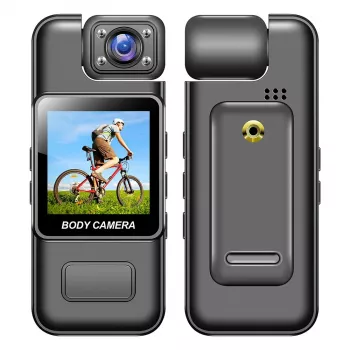
Some moments are worth keeping as more than a memory. Whether you want a visual record of an activity or a convenient way to document part of your day, a wearable camera can keep recording within reach. Our Ultra HD 4K WiFi Body Camera brings together high-resolution video, wireless connectivity, night vision, and motion detection in a compact format.
A body camera for everyday recording
Our in-stock Ultra HD 4K WiFi Body Camera with Night Vision & Motion Detection is an option if you want a camera you can wear while documenting activities or keeping a visual record. You might use it to capture a project as it progresses, record a walk, or review footage from an activity afterward.
A body camera can also be useful when you want your hands available for the activity itself. The view will depend on where you position the camera, so it helps to consider what you want to capture before you start. A quick test can reveal whether the camera is pointed too high, too low, or away from the scene.
At the time of listing, the camera is priced at $24.51 USD. Price and availability may change, so visit the product page for the latest information before ordering.
Four features to know
The camera combines several features that serve different purposes. Ultra HD 4K is a high-resolution video option, while WiFi provides wireless connectivity. Night vision is intended for low-light recording, and motion detection is designed to detect movement. Review the current product details to see what is included and whether the camera meets your needs.
| Feature | What it offers |
|---|---|
| Ultra HD 4K | A high-resolution video option |
| WiFi | Wireless connectivity |
| Night vision | A feature for recording in low-light conditions |
| Motion detection | A feature designed to detect movement |
These features address different recording situations, but they do not replace a practical test. For example, a low-light scene may look different from a daytime recording, and your intended camera position may affect what appears in the frame. Familiarizing yourself with the available settings can help you decide how to use the camera for a particular activity.
Make the most of your camera
Before relying on the camera for an important recording, review its settings and make a short test clip. Play it back to see whether the scene is framed as you intended. If the view is blocked by clothing or points away from the action, adjust the camera and test again.
When positioning the camera, consider how you will move during the activity. A view that looks right while you are standing still may change when you bend, turn, or walk. After recording, check the footage so you can make adjustments for next time and keep the clips you need organized.
Follow the included instructions for WiFi and motion detection setup. Take time to understand the available controls before you begin, and use the instructions to troubleshoot any setup questions. We recommend testing those features in the setting where you plan to use them rather than waiting until you need a particular recording.
Match your setup to the activity
Think about the conditions around you as well as the scene you want to record. If your plans include time on the water, for example, our 3.6M Thickened PVC Inflatable Kayak is another in-stock option to explore. Do not assume the body camera is waterproof; review its instructions and protect it from conditions it is not designed to handle.
Record with privacy in mind
Recording can involve other people, their conversations, or places where they expect privacy. Before you begin, check the recording and consent laws that apply in your location, especially if audio may be captured. Ask for permission where required, and be considerate about when and where you record.
Once you have footage, handle it responsibly. Secure any connected devices, limit access to recordings, and avoid sharing clips that expose someone’s private information without an appropriate reason. The Federal Trade Commission’s guidance on using security cameras offers additional information about protecting connected cameras and respecting privacy.
Explore the body camera
If you want a wearable camera with 4K video, WiFi, night vision, and motion detection, our team invites you to explore the product page. You can review the current details, price, and availability before deciding whether it fits the way you plan to record.
Before choosing, compare the product details with your daily routine, available space, care needs, and preferred setup. The strongest option is usually the one that fits the intended use clearly and remains simple to clean, store, and check before repeat use.
It is also worth checking measurements, material notes, included parts, and compatibility details so the item matches the way it will be used after delivery.
FAQ
Does this body camera have night vision?
Yes. Night vision is listed as a feature for recording in low-light conditions.
Does the camera support WiFi?
Yes. WiFi is listed as a feature; follow the included instructions for setup.
What should I check before recording other people?
Check applicable local recording and consent laws, especially if audio may be captured, and respect others’ privacy.
Recommended for you

Rick Owens Cashmere V-Neck Sweater: Style and Care
Nov 20, 2026
A Calmer Guide to Managing Credit Card Payments
Nov 20, 2026













Leave a comment