-
Shop
- Advanced Technologies
- AI Skills
- Bathroom
- Best-Sellers
- Car Accessories
- Confidence
- Dating & Social Skills
- Digital Resources
- AI & Technology
- Beauty
- Budgeting & Saving
- Car Buying & Ownership
- Cozy Feast Collection
- Electronics & Technology
- Entrepreneurship & Business Growth
- Financial Education
- Financial Independence
- Financial Mindset & Psychology
- Goal Setting
- Home Styling & Organization
- Kitchen & Recipes
- Leadership
- Mindfulness
- Mindset
- Online Business
- Parenting & Child Development
- Personal Style & Fashion
- Pet Lifestyle & Wellness
- Positive Thinking
- Sleep Improvement
- Smart Life with AI
- Stress Management & Relaxation
- Travel Planning
- Wellness
- Yoga & Fitness
- Yoga & Mind-Body Practices
- Education & Learning
- Family & Parenting
- Fashion
- Accessories
- Alexander McQueen
- Bags
- Bags & Wallets
- Balenciaga
- Belts
- Blazers
- Bottega Veneta
- Bottoms
- Brunello Cucinelli
- Burberry
- Chanel
- Chloé
- Dior
- Dolce & Gabbana
- Dresses
- Etro
- Fendi
- Gucci
- Hats & Hair Accessories
- Hoodies & Sweatshirts
- Jacquemus
- Jewelry
- Jil Sander
- Kiton
- Luggage
- Miu Miu
- Off-White
- Outerwear
- Prada
- Rick Owens
- Saint Laurent
- Shoes
- Socks & Tights
- Sweaters & Cardigans
- The Row
- Tom Ford
- Tops & Shirts
- Valentino
- Valentino Garavani
- Versace
- Vivienne Westwood
- Watches
- Fashion Accessories
- Furniture
- Gadgets
- Health & Beauty
- Health & Wellness
- Home & Garden
- Home Decor
- Home Electronics
- Home Supplies
- Kids & Babies
- Kitchen
- Kitchen Best-Sellers
- Lighting
- Patio, Lawn & Garden
- Personal Growth
- Pet Care
- Pet Supplies
- Pets
- Sport & Outdoors
- Super Deals
- Travel
- Travel & Adventure
- Wealth
- Popular
- Best deals
60-Inch L-Shaped Office Desk with Drawers and USB
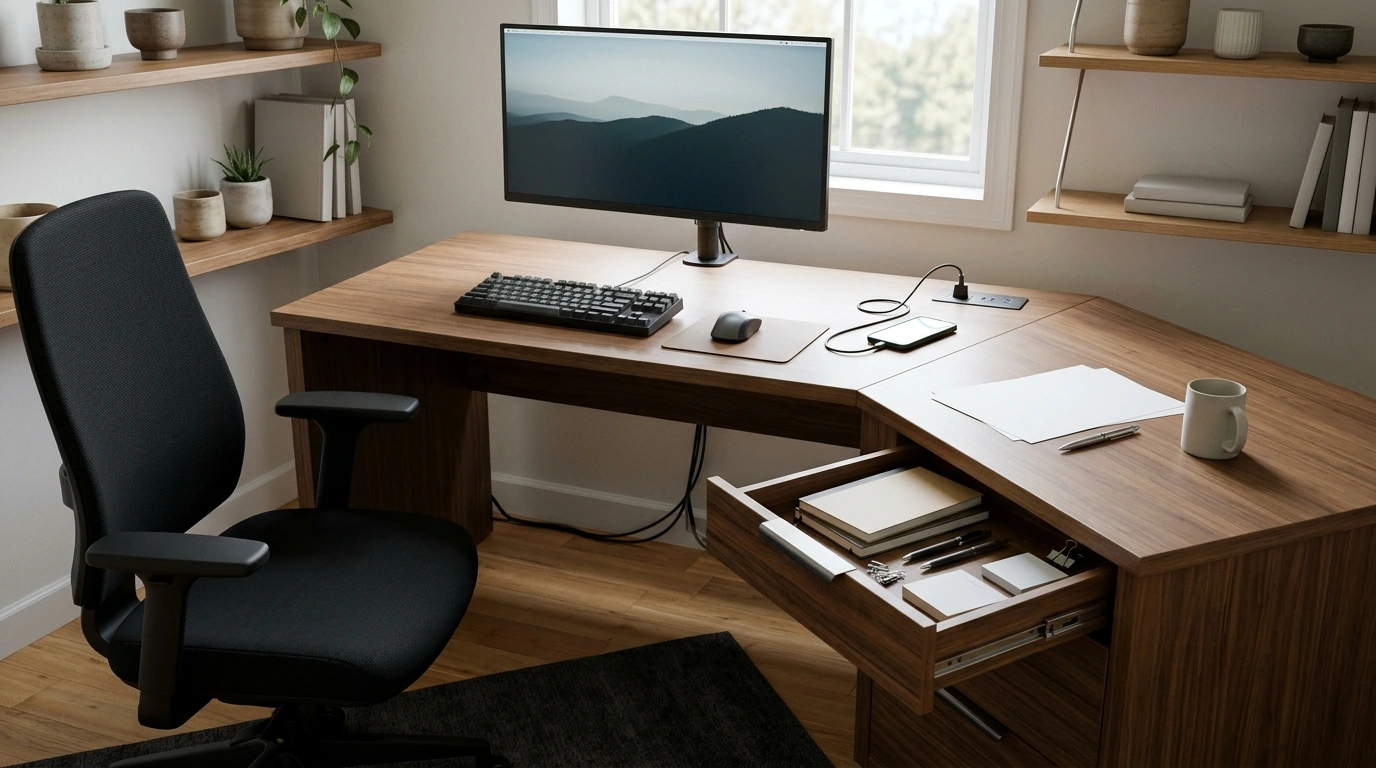
A workspace can feel easier to manage when your supplies and devices have a place to go. Our 60-inch L-shaped office desk brings together a work surface, drawers, a power outlet, and USB charging ports, so you can organize everyday essentials and keep compatible devices close at hand.
Whether you are setting up a home office or refreshing a business workspace, a little planning can help you make the most of the layout. Start with the tasks you do most often, then consider how you move between your computer, paperwork, and other supplies.
Room to Work in an L-Shaped Layout
An L-shaped desk gives you a way to organize work across two sections of a surface. You might place your monitor and keyboard in one area and reserve another for reviewing documents, taking notes, or sorting mail. Separating activities can make it easier to switch tasks without moving everything each time.
Our 60-inch L-shaped office desk with drawers and charging ports is listed as a 60-inch model. Before ordering, measure your available space and check any additional dimensions on the product page. Consider not only the desk’s footprint but also the space you need to sit down, move your chair, and reach the drawers.
It can help to mark the intended workspace on the floor before you buy. Walk around the area and make sure doors, walkways, and nearby storage remain accessible. If you share the room, consider how others will move through it while you are working.
Keep Essentials Within Reach
The desk includes drawers that can help you organize stationery and frequently used office supplies. Pens, sticky notes, and other small items are easier to find when you give them a consistent home instead of leaving them scattered across your work surface.
Keep the items you use throughout the day close by, and store less frequently used materials elsewhere. A simple routine, such as returning supplies to their places at the end of the day, can make the next morning’s setup quicker. You can also set aside a clear spot for paperwork that needs your attention.
Think about what you reach for while seated. Placing everyday items where you can access them comfortably reduces the need to interrupt your work to search for a notebook or charging cable. Leave enough open desktop space for the tasks that matter most to you.
Power and Charging at Your Desk
The integrated power outlet and USB charging ports provide convenient access points for compatible devices. You can keep a device close while it charges rather than arranging your entire workspace around a distant power source.
Before connecting equipment, check each device’s requirements and compatibility. Plan where cords will run, keeping them organized and away from walking paths or areas where they might become tangled. Avoid stretching cables across the floor or placing them where a chair can roll over them.
For broader electrical safety guidance, visit the Electrical Safety Foundation. Taking a moment to plan your connections can help keep the workspace tidier and make it easier to unplug or move a device when needed.
At a Glance
Our team has summarized the desk’s listed features below to help you compare them with your everyday needs.
| Feature | Everyday use |
|---|---|
| 60-inch L-shaped design | Arrange work across an L-shaped surface |
| Drawers | Keep office supplies within reach |
| Power outlet | Connect a compatible device at the desk |
| USB charging ports | Keep compatible devices close while charging |
| Listed price | $425.17 USD |
The listed price and availability may change. Visit the product page for current purchase details before placing an order.
Make the Desk Work for Your Space
Before setting up, decide where your monitor, keyboard, and most-used supplies will sit. Keep your primary work area clear enough for comfortable movement, and use the other part of the L-shaped layout for activities that benefit from a separate space.
Position the workspace near an appropriate wall outlet, with a practical path for the power connection. Also consider lighting and screen placement: reducing glare can make it easier to see your work without constantly changing position.
For help arranging your screen, chair, and other equipment, review the OSHA Computer Workstations eTool. Your setup should fit your body and the way you work, so allow time to make adjustments after you begin using it.
If you run a small business from your workspace, you may also want to explore our AI for Small Business Toolkit – 5-in-1 Digital Download Bundle. It is a separate digital product you can consider alongside your physical office setup.
When you are ready to plan your workspace, view the desk’s product page for current availability and purchase details.
FAQ
Does this desk include storage?
Yes. The desk includes drawers for organizing office essentials such as stationery and frequently used supplies.
Can I charge devices at the desk?
Yes. The desk includes a power outlet and USB charging ports; check your device requirements and compatibility before connecting.
How much space should I allow for the desk?
Measure your intended area and leave room for seating, movement, and access. The desk is listed as a 60-inch model; check the product page for any additional dimensions.
Recommended for you

How Long Does a Coolant Temperature Sensor Last?
Nov 5, 2026
Plan Your Gathering with an Edible Decor Toolkit
Nov 5, 2026













Leave a comment