-
Shop
- Advanced Technologies
- AI Skills
- Bathroom
- Best-Sellers
- Car Accessories
- Confidence
- Dating & Social Skills
- Digital Resources
- AI & Technology
- Beauty
- Budgeting & Saving
- Car Buying & Ownership
- Cozy Feast Collection
- Electronics & Technology
- Entrepreneurship & Business Growth
- Financial Education
- Financial Independence
- Financial Mindset & Psychology
- Goal Setting
- Home Styling & Organization
- Kitchen & Recipes
- Leadership
- Mindfulness
- Mindset
- Online Business
- Parenting & Child Development
- Personal Style & Fashion
- Pet Lifestyle & Wellness
- Positive Thinking
- Sleep Improvement
- Smart Life with AI
- Stress Management & Relaxation
- Travel Planning
- Wellness
- Yoga & Fitness
- Yoga & Mind-Body Practices
- Education & Learning
- Family & Parenting
- Fashion
- Accessories
- Alexander McQueen
- Bags
- Bags & Wallets
- Balenciaga
- Belts
- Blazers
- Bottega Veneta
- Bottoms
- Brunello Cucinelli
- Burberry
- Chanel
- Chloé
- Dior
- Dolce & Gabbana
- Dresses
- Etro
- Fendi
- Gucci
- Hats & Hair Accessories
- Hoodies & Sweatshirts
- Jacquemus
- Jewelry
- Jil Sander
- Kiton
- Luggage
- Miu Miu
- Off-White
- Outerwear
- Prada
- Rick Owens
- Saint Laurent
- Shoes
- Socks & Tights
- Sweaters & Cardigans
- The Row
- Tom Ford
- Tops & Shirts
- Valentino
- Valentino Garavani
- Versace
- Vivienne Westwood
- Watches
- Fashion Accessories
- Furniture
- Gadgets
- Health & Beauty
- Health & Wellness
- Home & Garden
- Home Decor
- Home Electronics
- Home Supplies
- Kids & Babies
- Kitchen
- Kitchen Best-Sellers
- Lighting
- Patio, Lawn & Garden
- Personal Growth
- Pet Care
- Pet Supplies
- Pets
- Sport & Outdoors
- Super Deals
- Travel
- Travel & Adventure
- Wealth
- Popular
- Best deals
55-Inch Standing Desk: Fits 2 Monitors + Laptop?
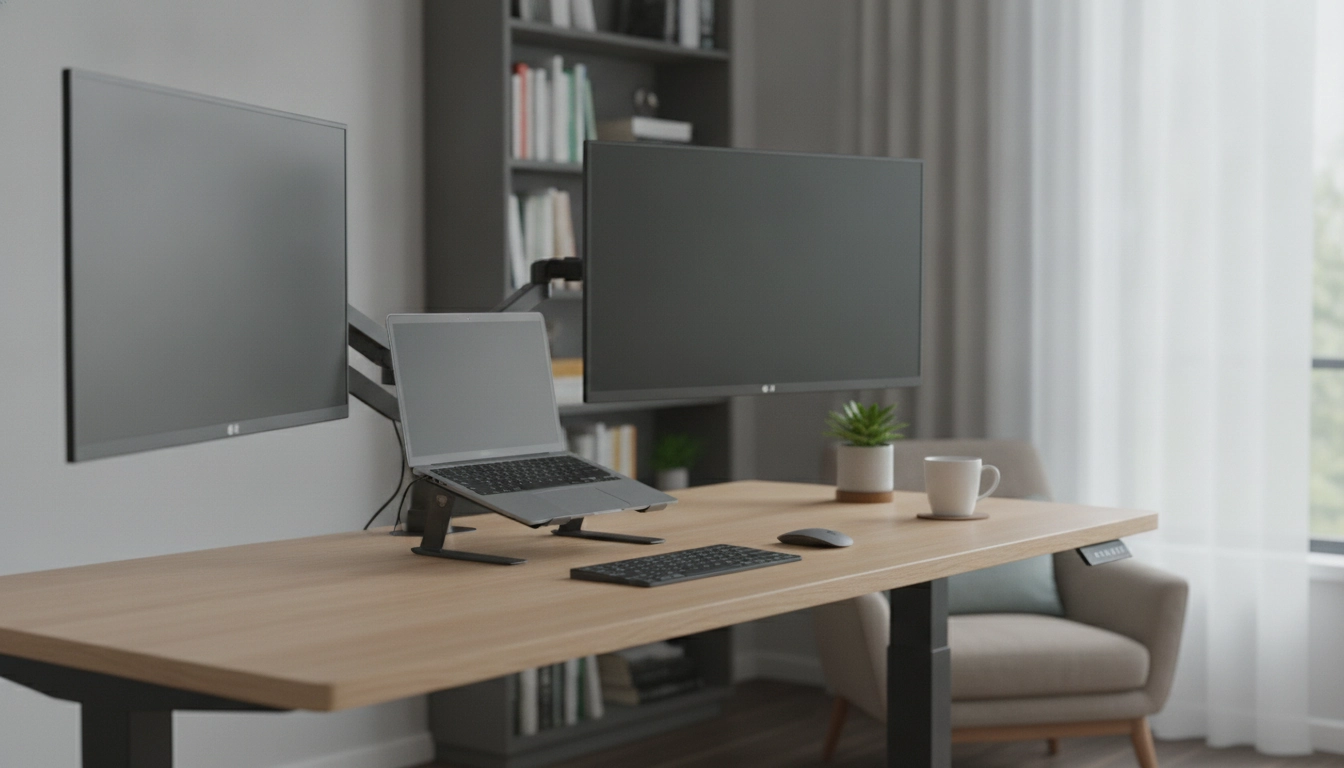
Is a 55-inch standing desk wide enough for two monitors and a laptop?
In many setups, yes—a 55-inch standing desk can comfortably handle two monitors and a laptop, as long as you plan the layout and choose the right monitor sizes and stands. A 55-inch width gives you enough horizontal real estate for side-by-side displays while leaving space for a laptop to sit slightly off-center or on a riser.
The biggest factor is monitor footprint, not just screen size. Two 24-inch monitors on standard bases can take up a surprising amount of desk depth and width. If you’re aiming for two 27-inch monitors plus a laptop, the desk can still work, but it becomes much easier if you use a dual monitor arm. Arms reduce base clutter, free up surface space for the laptop, and let you align screens at a comfortable height when switching between sitting and standing.
What layout works best on a 55-inch desk?
A practical arrangement is to center your “main” monitor, place the second monitor to the side (slightly angled), and keep the laptop on the opposite side or on a small stand. If you use the laptop as a third screen, consider placing it below or beside your main monitor so your keyboard and mouse remain centered. A compact keyboard or a keyboard tray can also help maintain a comfortable mousing area without feeling cramped.
Will the desk depth matter?
Yes. A deeper top makes a 55-inch desk feel significantly larger because it increases viewing distance and leaves room for accessories. If your monitors feel too close, a monitor arm can pull them back and reclaim depth for your hands, notes, or a docking station.
For dimensions, material, and setup ideas for a modern option in this size, see the full guide here: https://bestsellis.com/guide-modern-55-inch-standing-desk-metal-frame-solid-wood-top/.
FAQ
What monitor sizes fit best on a 55-inch standing desk?
Two 24-inch monitors are an easy fit for most people, especially with an arm mount. Two 27-inch monitors can work, but a dual monitor arm and a tight accessory setup usually make it much more comfortable.
Recommended for you

Money Scripts: 4 Common Beliefs Shaping Your Choices
Aug 10, 2026












Leave a comment